अगर आप भी Instagram Reels और YouTube Shorts पर वायरल हो रहे AI Videos देखते हैं, तो आपने Jatayu Rising जैसे शानदार Cinematic Videos जरूर देखे होंगे। इन Videos में जटायु को एक विशाल दिव्य पक्षी के रूप में आसमान की ओर उड़ते हुए दिखाया जाता है। इसके पीछे शानदार पहाड़, बादल, सिनेमैटिक लाइटिंग और जबरदस्त Visual Effects देखने को मिलते हैं।
पहले इस तरह के वीडियो बनाने के लिए Video Editing और Animation की अच्छी जानकारी होना जरूरी था, लेकिन अब AI की मदद से आप भी ऐसे शानदार वीडियो बना सकते हैं। इसके लिए Google Flow जैसे AI Video Creation Tool का इस्तेमाल किया जा सकता है।
अगर आप भी JATAYU RISING VIDEO PROMPT की मदद से अपना खुद का वीडियो बनाना चाहते हैं, लेकिन आपको समझ नहीं आ रहा कि Google Flow में कौन-सा Prompt लिखना है और वीडियो कैसे तैयार करना है, तो इस आर्टिकल को शुरू से लेकर आखिर तक पढ़ते रहिए।
आज हम आपको बताएंगे कि Google Flow क्या है, Jatayu Rising Video कैसे बनाएं, इसके लिए कौन-सा Prompt इस्तेमाल करें और तैयार वीडियो को Download कैसे करें।
Google Flow क्या है?
Google Flow गूगल का एक AI Video Creation Tool है, जिसकी मदद से आप Text Prompt, Images और Reference Videos का इस्तेमाल करके वीडियो बना सकते हैं।
इसमें आप अपनी पसंद के अनुसार किसी Scene को तैयार कर सकते हैं। उदाहरण के लिए, अगर आप चाहते हैं कि वीडियो में एक व्यक्ति खड़ा हो और उसके पीछे एक विशालकाय जटायु पक्षी अपने बड़े-बड़े पंख फैलाते हुए आसमान की तरफ उठे, तो आप इस Scene को Prompt में समझा सकते हैं।
Smart Settings Guru
Google Flow में आप Text-to-Video के अलावा Images और Reference Frames की मदद से भी वीडियो तैयार कर सकते हैं।
Jatayu Rising Video कैसा होता है?
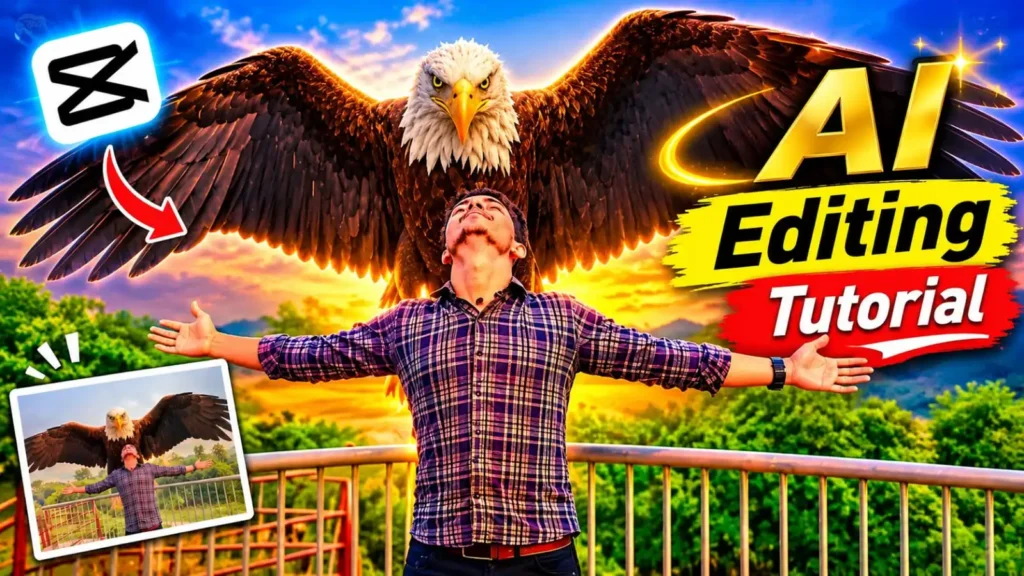
Jatayu Rising Video एक ऐसा Cinematic AI Video Concept है जिसमें एक विशालकाय पक्षी जटायु को दिखाया जाता है। इसमें आमतौर पर एक व्यक्ति कैमरे के सामने खड़ा होता है और उसके पीछे सुनहरे रंग का आसमान दिखाई देता है।
कुछ ही पलों में उसके पीछे एक विशालकाय भूरे और सुनहरे पंखों वाला पक्षी दिखाई देता है। वह अपने बड़े-बड़े पंख फैलाता है और धीरे-धीरे ऊपर की ओर उठने लगता है। उसके आसपास छोटे-छोटे पक्षी भी उड़ते हुए दिखाई देते हैं।
इस तरह का वीडियो देखने में किसी बड़ी फिल्म के Scene जैसा लगता है। अच्छी बात यह है कि आप भी अपनी फोटो और सही AI Prompt की मदद से इस तरह का वीडियो बनाने की कोशिश कर सकते हैं।
Jatayu Rising Video बनाने के लिए क्या-क्या चाहिए?
वीडियो बनाने से पहले आपको कुछ जरूरी चीजों की आवश्यकता होगी।
- Google Account: Google Flow इस्तेमाल करने के लिए Google Account होना चाहिए।
- Google Flow: वीडियो Generate करने के लिए Google Flow की वेबसाइट खोलनी होगी।
- अपनी फोटो: ऐसी साफ फोटो जिसमें आपका चेहरा स्पष्ट दिखाई दे।
- Reference Video (वैकल्पिक): अगर आप किसी खास वायरल वीडियो जैसा ही Camera Movement और Action चाहते हैं, तो उसका Reference Video इस्तेमाल कर सकते हैं।
- Jatayu Rising Video Prompt: नीचे दिया गया Prompt कॉपी करके इस्तेमाल कर सकते हैं।
ध्यान रखें कि Reference Video और अपनी फोटो अपलोड करने पर AI को यह समझने में मदद मिलती है कि वीडियो में किस तरह का दृश्य और व्यक्ति दिखाना है।
Click to chat
यह एक promotional advertisement design है। INSTALL पर क्लिक करने से निर्धारित लिंक खुलेगा।
Google Flow से Jatayu Rising Video Kaise Banaye?
अब बात करते हैं सबसे जरूरी प्रक्रिया की। अगर आप पहली बार Google Flow इस्तेमाल कर रहे हैं तो नीचे दिए गए Steps को ध्यान से फॉलो करें।
Step 1. Google Flow Website खोलें
सबसे पहले अपने मोबाइल या कंप्यूटर में Chrome Browser ओपन करें। इसके बाद Google Flow की Official Website पर जाएं।
अब अपने Google Account से Login करें। अगर आपके अकाउंट में Flow उपलब्ध है तो आप इसका इस्तेमाल शुरू कर सकते हैं।
Step 2. नया Project बनाएं
वेबसाइट ओपन होने के बाद New Project या नया Project बनाने का विकल्प चुनें।
इसके बाद आपके सामने एक नया Workspace खुल जाएगा, जहां से आप AI Video Generate कर सकते हैं।
Step 3. अपनी Photo Upload करें
अब आपको अपनी एक अच्छी फोटो तैयार रखनी है।
- फोटो में आपका चेहरा साफ दिखाई देना चाहिए।
- फोटो धुंधली नहीं होनी चाहिए।
- कोशिश करें कि फोटो में केवल एक ही व्यक्ति हो।
- अगर संभव हो तो Full Body Photo इस्तेमाल करें।
Google Flow के Prompt Box में Add Image के विकल्प से अपनी फोटो अपलोड करें।
AI Face Swap
Step 4. Reference Video Upload करें (अगर उपलब्ध हो)
अगर आप बिल्कुल उसी तरह का Jatayu Rising Effect चाहते हैं जैसा किसी Reference Video में दिखाई देता है, तो उस वीडियो को भी अपलोड कर सकते हैं।
इसके लिए Flow में Video-to-Video या उपलब्ध Reference/Ingredients विकल्प का इस्तेमाल करें। ध्यान रहे कि हर Video Model में ये सभी सुविधाएं उपलब्ध नहीं होतीं। Google Flow Help +1
Step 5. Jatayu Rising Video Prompt डालें
अब सबसे महत्वपूर्ण काम करना है। नीचे दिया गया Prompt कॉपी करें और Google Flow के Prompt Box में पेस्ट कर दें।
Jatayu Rising Video Prompt (Copy करें)
Ready to Copy
नीचे दिया गया English Prompt इस्तेमाल करें। AI Video Generator में English में Scene, Camera Movement और Character Details स्पष्ट रूप से बताने से आपको अपने मनचाहे दृश्य को निर्देशित करने में आसानी होगी।
नोट: यह Prompt Reference Video और Photo दोनों इस्तेमाल करने के लिए बनाया गया है। अगर Flow में आपकी अपलोड की गई फाइलों के नाम @video1 और @image1 से अलग हैं, तो Prompt में सही Reference नाम इस्तेमाल करें।
बिना Reference Video के Jatayu Rising Prompt
अगर आपके पास Reference Video नहीं है तो भी आप Text-to-Video की मदद से इसी तरह का Scene बना सकते हैं। इसके लिए नीचे वाला Prompt इस्तेमाल करें।
एक जरूरी बात: बिना Reference Video वाले Prompt में AI खुद Camera Movement और Scene तैयार करेगा। इसलिए उसका परिणाम किसी खास वायरल वीडियो जैसा बिल्कुल एक समान होने की गारंटी नहीं है।
Tech Tips Pro
Google Flow में कौन-सी Settings रखें?
वीडियो Generate करने से पहले अपनी जरूरत के अनुसार ये Settings चुनें।
| Setting | सुझाव |
|---|---|
| Video Mode | Text to Video या Reference Video |
| Aspect Ratio | 9:16 (Reels/Shorts) |
| Quality | उपलब्ध बेहतर विकल्प |
| Duration | उपलब्धता के अनुसार |
| Model | Video Generation के लिए उपलब्ध Veo/अन्य Video Model |
Google Flow में Aspect Ratio, Video Model, Generation Length और Outputs जैसे विकल्प उपलब्ध होते हैं। इनकी उपलब्धता चुने गए Model और अकाउंट के अनुसार बदल सकती है। Google Flow Help +1
Step 6. Generate Button पर क्लिक करें
सभी Settings चुनने और Prompt डालने के बाद Generate पर क्लिक करें।
अब Google Flow आपके Prompt के अनुसार वीडियो तैयार करना शुरू कर देगा। इसमें कुछ समय लग सकता है। अगर पहला परिणाम आपकी उम्मीद के अनुसार नहीं आता है तो Prompt में जरूरी बदलाव करके दोबारा Generate कर सकते हैं।
Step 7. वीडियो को Download करें
जब आपका वीडियो तैयार हो जाए तो उसे Preview करके देखें। अगर वीडियो सही बना है तो वीडियो के उपलब्ध Download विकल्प से उसे अपने डिवाइस में सेव कर लें।
इसके बाद आप चाहें तो CapCut जैसे Video Editing App में Music, Sound Effects और जरूरत के अनुसार अन्य Editing कर सकते हैं।
Jatayu Rising Video बनाते समय इन बातों का ध्यान रखें
अगर आप चाहते हैं कि आपका AI Video देखने में ज्यादा Realistic लगे तो कुछ जरूरी बातों का ध्यान रखना चाहिए।
- हमेशा साफ और अच्छी Quality वाली Photo इस्तेमाल करें।
- Reference Video में व्यक्ति की Position और Camera Angle का ध्यान रखें।
- Prompt में Jatayu के पंखों, उड़ने की गति और Camera Movement को स्पष्ट बताएं।
- एक ही वीडियो को बार-बार Generate करने से पहले Prompt में जरूरी सुधार करें।
- किसी दूसरे व्यक्ति की फोटो इस्तेमाल कर रहे हैं तो उसकी अनुमति जरूर लें।
- किसी अनजान वेबसाइट पर अपनी Photo या Google Account की जानकारी अपलोड न करें।
Jatayu Rising Video से जुड़े FAQs
1. Jatayu Rising Video कैसे बनाएं?
Jatayu Rising Video बनाने के लिए Google Flow का इस्तेमाल कर सकते हैं। इसमें अपनी Photo और जरूरत के अनुसार Reference Video अपलोड करके सही Prompt डालें और Generate विकल्प पर क्लिक करें।
2. क्या Google Flow से अपनी फोटो का Jatayu Video बना सकते हैं?
जी हां, Google Flow में Image References और Video Generation की सुविधाओं की मदद से अपनी फोटो को वीडियो में शामिल करने की कोशिश कर सकते हैं।
3. Jatayu Rising Video बनाने के लिए Reference Video जरूरी है?
नहीं, Reference Video जरूरी नहीं है। आप Text-to-Video Prompt की मदद से भी ऐसा वीडियो बना सकते हैं। हालांकि किसी खास वीडियो के Camera Movement और Actions की नकल करने के लिए Reference Video उपयोगी हो सकता है।
4. क्या Google Flow से 9:16 में वीडियो बना सकते हैं?
जी हां, Google Flow में उपलब्ध Video Model के अनुसार 9:16 Aspect Ratio चुनकर Instagram Reels और YouTube Shorts के लिए वीडियो बना सकते हैं।
5. क्या Google Flow फ्री में इस्तेमाल कर सकते हैं?
Google Flow में Free Access और Paid Subscription के विकल्प उपलब्ध हैं। Free Access में भी कुछ सुविधाएं मिल सकती हैं, लेकिन Credits और Generation Limits लागू हो सकती हैं। वर्तमान जानकारी के लिए Google Flow Plans देखें।
6. Jatayu Rising Video के लिए सबसे अच्छा Prompt कौन-सा है?
इस आर्टिकल में दिया गया Reference Video वाला Prompt उन लोगों के लिए उपयोगी है जो अपनी फोटो को किसी खास Jatayu Rising Scene में शामिल करना चाहते हैं। बिना Reference Video के दूसरा Prompt इस्तेमाल कर सकते हैं।
✨ Video Prompt
निष्कर्ष – Google Flow से Jatayu Rising Video Kaise Banaye?
दोस्तों, आज के इस आर्टिकल में हमने आपको बताया कि Google Flow की मदद से Jatayu Rising Video कैसे बना सकते हैं। इसके अलावा हमने आपको Jatayu Rising Video Prompt भी दिया है, जिसकी मदद से आप अपनी फोटो का एक शानदार Cinematic AI Video तैयार करने की कोशिश कर सकते हैं।
अगर आप पहली बार AI Video बना रहे हैं तो घबराने की जरूरत नहीं है। ऊपर बताए गए सभी Steps को ध्यान से Follow करें और दिए गए Prompt को Google Flow में इस्तेमाल करें।
उम्मीद करते हैं कि आपको यह जानकारी पसंद आई होगी। अगर आपको वीडियो बनाने में किसी तरह की परेशानी आती है या Prompt से संबंधित कोई सवाल है तो हमें Comment करके जरूर बताएं।
इस जानकारी को अपने दोस्तों के साथ भी Share करें ताकि वे भी अपनी फोटो से शानदार Jatayu Rising AI Video बना सकें।